Dashboard FAQ
Numbers not 'adding up'
It's common to see that the numbers in your dashboard aren't adding up. The Unique visitors metric counts each visitor once for the selected period. The Top Pages report counts visitors separately for each page, so someone who visits several pages appears in several rows. Adding those rows can therefore give a higher number than the dashboard's total unique visitors.
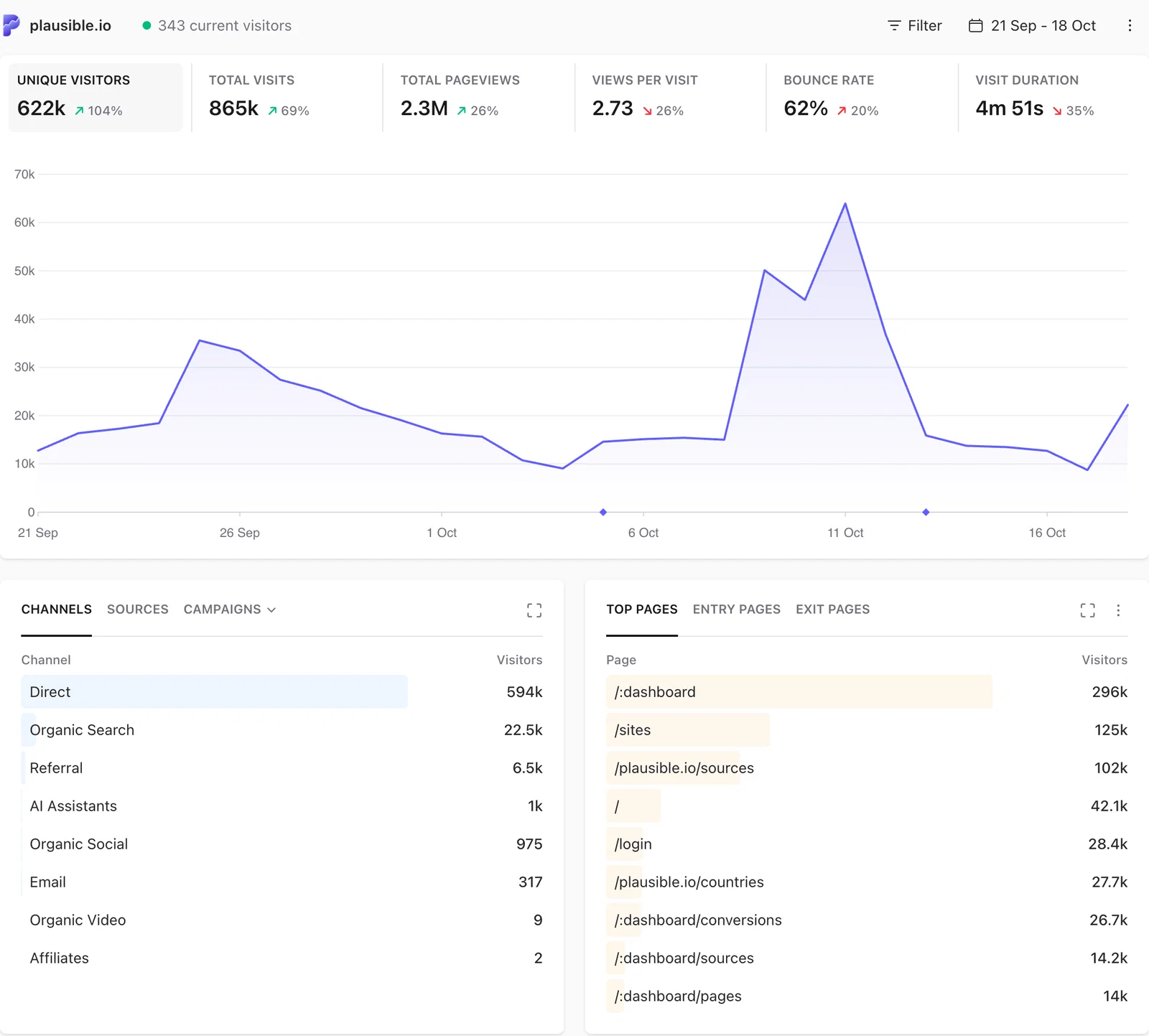
This happens because visitors can view more than a single page or trigger more than a single custom event on your site. Imagine a single visitor triggering two pageviews: /page1 and /page2. In this case your Plausible dashboard would show 1 unique visitor in total. However, the Top Pages tab would show one unique visitor for /page1 and one unique visitor for /page2.
This is why adding up unique visitor numbers and comparing them to the total is misleading. Since visitors aren't limited to a single pageview or action on your site, you shouldn't expect these numbers to be equal.
There's another situation where differences might occur. If you manually tally the unique visitors for each day in a month, you may not get the same result as the number of unique visitors you see in the report for that month. This discrepancy is due to sessions that overlap with our daily reset. Consider this: If someone visits your site 5 minutes before our daily reset and they continue being engaged with your site until 5 minutes after the reset, their session will count as one unique visitor on each of the two days. However, in the monthly view, that visitor will be counted as one unique visitor only.
Unique visitors or Total visits greater than Pageviews on a minute-interval graph?
On minute-interval graphs (such as the realtime dashboard), we count visitors and sessions based on whether their session was active. However, pageviews are counted in each time bucket where they actually happened.
Let's bring a simple example to understand this. Imagine there was only a single visitor who:
- landed on your website on 12:00 (first pageview)
- spent 10 minutes viewing the first page
- navigated to another page on your website at 12:10 (second pageview)
- left your site
Now if we focus on a specific minute on the graph like 12:05, there were no pageviews, but there was a session active during that minute. This is where Plausible would report "Unique visitors" (and "Total visits") as 1, while "Pageviews" is 0. Therefore, the number of visitors and visits is always higher than pageviews when we start summing the numbers up in minute buckets.
Note that this doesn't affect graphs with an hourly (or greater) interval. A session is ended automatically with at least 30 minutes of inactivity. This guarantees that there cannot exist an hour where a session was active, but didn't send us any pageviews.
Does Plausible exclude known bots and spam traffic?
Yes. Plausible uses multiple layers to filter bots, crawlers, referrer spam and other non-human traffic. See bot and spam traffic filtering for a full breakdown of how it works.
Does Plausible do data sampling?
Data sampling is the practice of analyzing a subset of all data to uncover the meaningful information in the larger data set. Most analytics tools including Google Analytics do data sampling for all their reports.
Plausible does not use any data sampling by default. We collect and store 100% of the data regardless of how many pageviews you have. The stats in your dashboard reflect 100% accurate data of what happens on your site.
However, on some dashboard views that have a lot of data such as those with more than 10 million pageviews, we apply limited data sampling to make the dashboard load as fast as possible.
Why do my numbers differ from Google Analytics?
Plausible and Google Analytics are designed differently, so their numbers will rarely match exactly. Some difference is normal and expected.
When Plausible reports higher numbers than GA
This is the more common case. Plausible doesn't use cookies and doesn't require a consent banner, so it captures visitors that GA misses when people decline consent. Plausible also counts visitors who use adblockers that block the GA script but not Plausible's script.
When Plausible reports lower numbers than GA
GA may be counting more events per visit than actual pageviews. This can happen due to duplicate tag firing, additional event types being counted as views, or configuration differences in how GA is set up.
A useful diagnostic
Compare the unique visitor or active user counts between the two tools, not just pageviews. If those are close, both tools are finding roughly the same audience and the pageview difference is a counting methodology issue, not a tracking gap. If unique visitors also differ significantly, it may point to a setup issue. Check our troubleshooting guide to verify your Plausible installation is working correctly.
When Direct / None is higher than in GA
Plausible credits each visit to the source it came from. When someone first finds you through a Google search and comes back a few days later by typing your address or using a bookmark, that second visit shows as Direct / None, and so does any conversion or revenue from it. Without cookies, nothing links the two visits. GA4 usually credits a direct visit to the last non-direct source it remembers for that browser, so the same purchase can show under Organic Search there.
This means Direct / None, along with the conversions and revenue credited to it, is often higher in Plausible than in GA4, even when the totals are close. To bring more of these visits under a named source, tag the links you control.
Why do my numbers differ from my email marketing tool?
If you send a campaign in MailChimp, ConvertKit or a similar tool and the click count doesn't match the visits in Plausible, a few things are usually going on:
- Bot and security scanner clicks. Email security tools automatically click links in emails to check for malicious content. These show up as clicks in your email tool but Plausible filters them as non-human traffic.
- Email client prefetching. Some email clients preload linked content before the recipient actually clicks. This registers as a click in the email tool but the visitor never lands on your site.
- Total clicks vs unique visitors. Email tools often report total link clicks, meaning one person clicking the same link twice counts as two clicks. Plausible counts unique visitors, so that same person counts as one.
Why do my numbers differ from my ad platform?
Discrepancies between Plausible and platforms like Facebook Ads or Google Ads are common, and usually larger than differences with other tools.
- Click fraud and bots. Paid traffic attracts automated click fraud. Ad platforms filter some of it but Plausible filters aggressively for non-human traffic, so Plausible's visit count will often be lower than the click count reported by the ad platform.
- Not every click becomes a visit. Someone can click an ad and close the tab before the page finishes loading. The ad platform records the click, Plausible records nothing.
- View-through attribution. Ad platforms like Facebook count conversions from people who saw an ad but never clicked it. Plausible only records actual visits to your site.
- Attribution windows. Ad platforms attribute a visit or conversion to a campaign days after the original click. Plausible records when the visit actually happened, so the numbers reflect different things.
- UTM tags. Without UTM tags on your ad links, Plausible counts the visits but can't connect them to the specific campaign in the traffic sources breakdown.
Why do my numbers differ from my server logs or hosting dashboard?
Server logs and hosting dashboards (Cloudflare, Netlify, Squarespace and similar) measure traffic at the infrastructure level, which is very different from what Plausible measures.
- Every request is counted. Server logs record requests for every image, CSS file, JavaScript file, font and API call, not just page visits. This inflates their numbers significantly compared to Plausible.
- Bots and crawlers. Search engine crawlers, scrapers and monitoring tools all appear in server logs. Plausible filters non-human traffic out.
- JavaScript is required. Plausible works by running a small script in the visitor's browser. Server logs record all requests regardless of whether a real person loaded the page.
- CDN caching can go the other direction. If your site uses a CDN and pages are served from cache, those visits never reach your origin server. In this case, server logs may actually show fewer visits than Plausible.
For a broader look at why numbers differ across analytics tools, see our blog post on the topic.
Why don't I see my own visits?
If you've just installed Plausible and aren't seeing your own visits, there are a few common reasons:
- WordPress plugin: Our official WordPress plugin excludes logged-in admin visits by default. If the verification tool confirms the tracking is working, you have nothing to worry about.
- Shields: The Shields feature lets you block visits based on IP addresses, hostnames, countries or specific pages. Check whether you have any rules that might be excluding your own visits.
- Adblockers: If you're using a browser extension or network-level adblocker, it may be blocking the Plausible script. Consider setting up a proxy to serve the script as a first-party connection.
For more details, see our full troubleshooting guide.
How quickly will I see data after installing the script?
Data appears in real-time. As soon as the first visit is counted after installing the Plausible snippet, your dashboard will start displaying stats with no delays. If you see a blinking green dot instead of the dashboard, it means we haven't recorded any visits yet. Our testing tool will launch automatically to help you verify the installation.
Where can I learn what each metric means?
See the metrics definitions page for a full explanation of every metric in your dashboard, including typical ranges and guidance on how to interpret them.